
New Car Sounds 2/3
Car Engine Sounds
Last week I explained the result of my proof-of-concept synthesizer for car engine sounds, and the architecture for properly integrating it into my game. This week was about implementing all of it correctly.
Overview
A little vocabulary I will use:
- bus: a channel I can add sounds to ; every sound is summed together and outputted as one
- synth: an object that is able to generate sound at runtime for the audio thread
Now, after this week of work, my game audio works according to the following diagram:
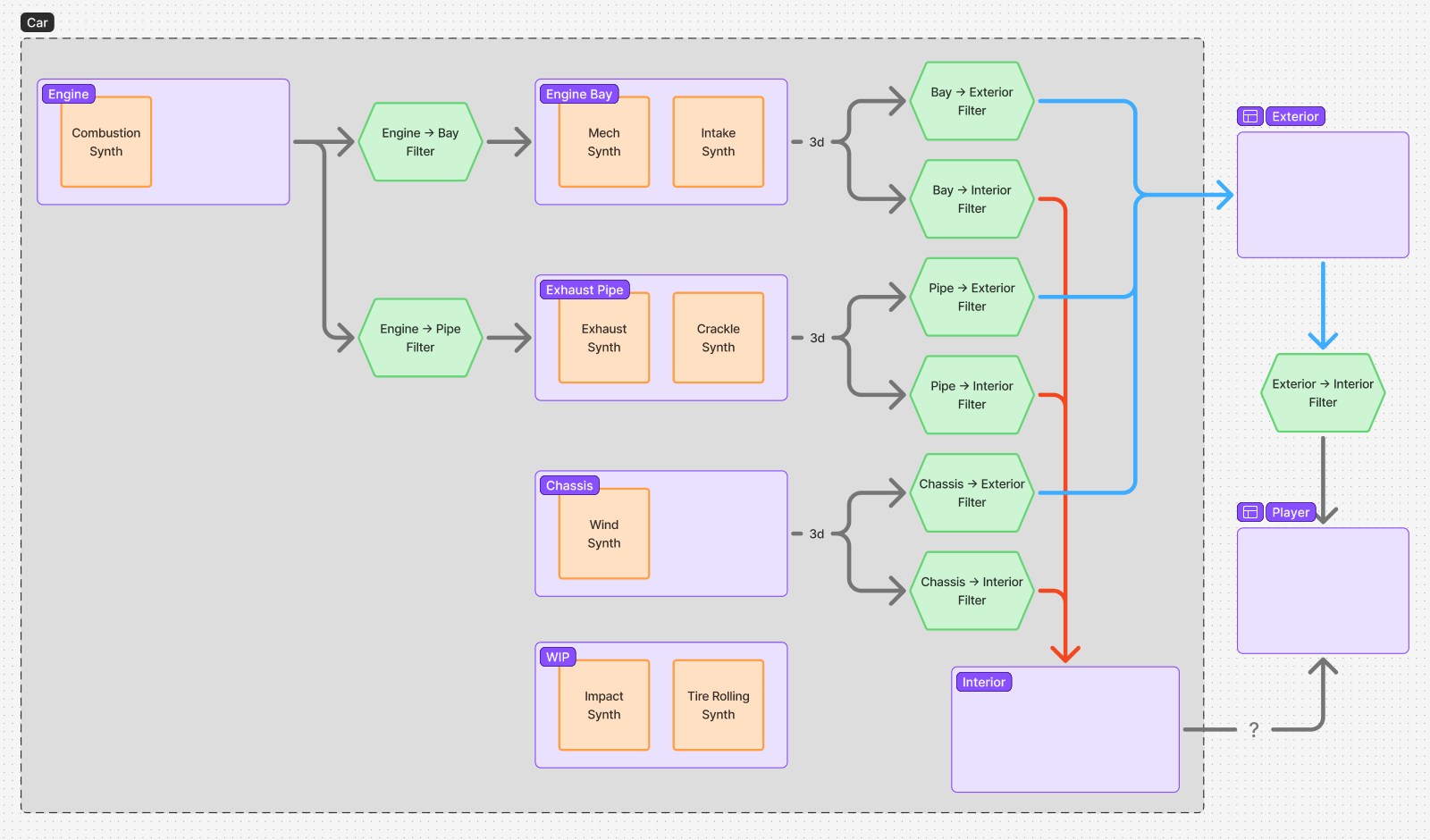
Legend:
- each orange node is a synth, it is controlled by the game's state and outputs into the bus of the space it lives in
- each purple section is a space, it is connected to other spaces through filters
- each green node is a filter, it represents how sound propagates through different mediums
- some sounds are spatialized (3d) meaning the miniaudio library will place them spatially based on the listener's position (stereo sound, so not real "3d")
Important things to notice:
- The listener ("Player") can be outside or inside a car (for now it matches the camera being used), so the "Exterior -> Interior" filter represents how exterior sound is heard from inside a car (or a helmet for cars without closed chassis); it is omitted (pass-through) if the listener is outside the car.
- If the listener is outside any car, it can only hear sounds that reach the exterior bus ; but if it is inside the car, it can also hear the sound that reaches the car's interior directly (link marked "?").
- Every car shares the same sound emission graph, so a player with the camera inside their car will hear their own car's interior sound as well as every car's exterior sound (through their car's "Exterior -> Interior" filter).
Synthesizers
I use 3 types of synthesizers for the main engine sounds:
- pitched noise synthesizers (Intake, Exhaust, Wind): emit noise in a frequency band driven by gameplay, representing the little noises that accumulate more or less frequently based on a continuous value (e.g. air passing through the exhaust pipe)
- grain synthesizers (Combustion, Mech): repeat sounds at a rate driven by gameplay (the "pop" I explained last week), representing somewhat-discrete sound events that overlap as they are repeated more frequently (e.g. engine's combustions)
- crackle synthesizer: repeats a sound randomly but less and less over time, here only representing uncontrolled combustions that happen in hot exhaust pipes when the engine is not under load but gas leaks through (e.g. during a gear switch)
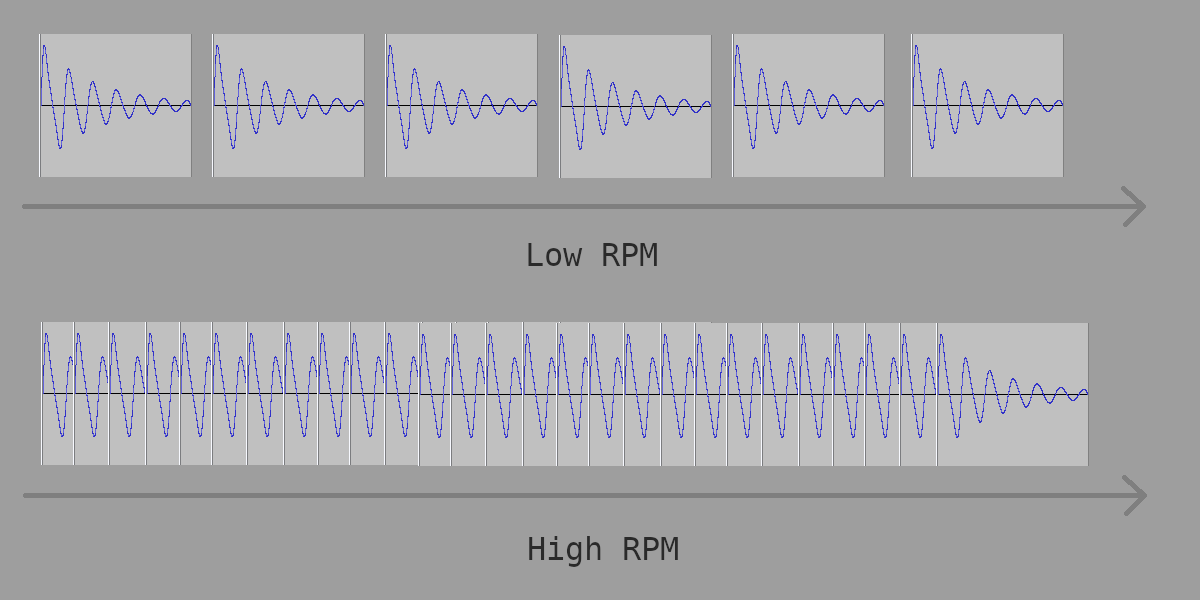
Above is the diagram that explains how the grain synthesizer works (should have been in last week's newsletter): at low RPM each pop sound is audible and pitch remains constant; at high RPM they blend, listener can hear the wave fronts repeating faster and thus pitch increases.
And then I use mostly the following biquad variants to build filters that modify how the synths sound:
- low-pass: lets low frequencies through but absorbs frequencies above a given value, useful to represent a thick material blocking high-pitch sounds
- peak: lets most frequencies through but boosts or cuts frequencies around a given value, useful to represent the specific resonant frequencies of a mechanism (e.g. the pipes the gas of a car engine goes through may amplify some sounds)
Let's Hear It
Additional work:
- a visualiser to configure every node from the graph and see what each filter looks like
- proper fade-in/fade-out when the camera teleports or changes between interior and exterior to avoid clipping (tick sound)
Notice:
- how the main filter (engine->exhaust pipe) affects what the engine sounds like
- the very audible resonant frequency at 1:40
- the difference when camera is inside or outside the cockpit
Impact And Rolling Sounds
The next part for audio is playing sounds for tires rolling on various surfaces as well as impact sounds when a car collides.
This week I did preparatory work in this direction (some I had started a while ago if you remember):
- make sure the collision system stores every contact at every integration step (goal: play rolling/sliding/scraping sounds and, later, particles)
- detect new contacts to emit impact events (goal: play impact sounds and, later, particles)
- have static objects reference material through a material id instead of storing a copy of their properties (goal: consistent materials, easier to associate a sound/particle to a specific impact, etc.)
Here I did a little test where I play a sound based on impact velocity:
Yes, it's very rough for now and requires a lot of work. I also turned off engine volume to make impacts more audible.
Next week I will work on properly synthesizing impact and rolling sounds, and integrating them into my spatialized sound system.